Benjamin Cunningham · Moreland University · Learning Environment Plan · Step 6 of the LEP · ED504 · October 18, 2026
Context and selection criteria
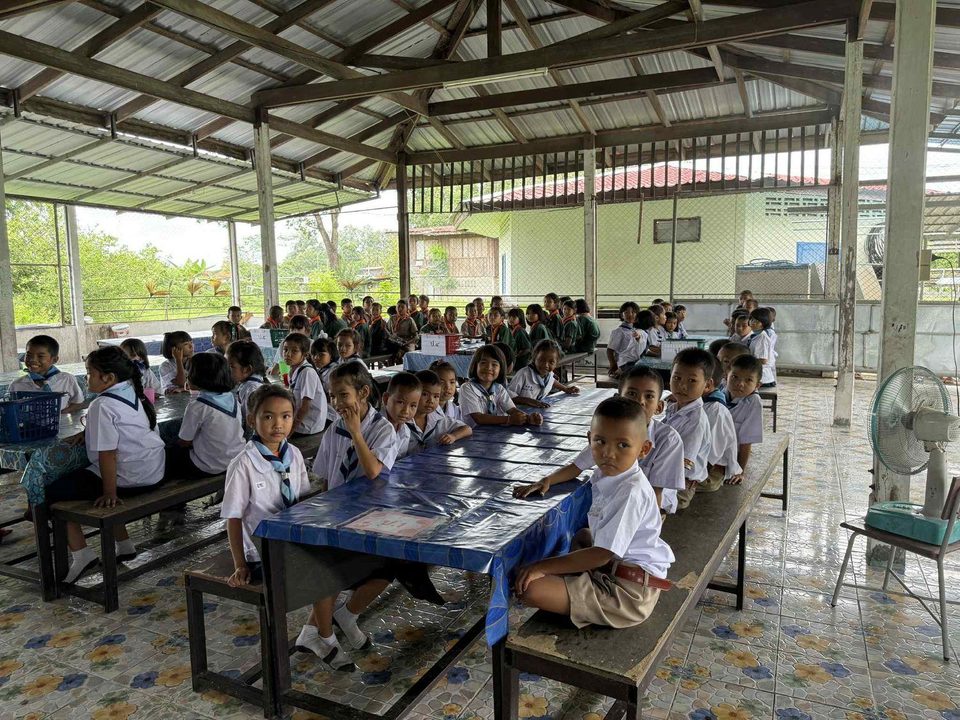
The room: Prathom 4–6 English, 30–45 children a class, a government village school in Rattanaburi district, Surin. One television at the front, the teacher's phone, the Thai co-teacher's phone, a laptop I bring, patchy 4G and no student devices. The homes: one shared phone per household, LINE on it, grandparents as the adults at home for many children, no English print. The online classroom: the one that opens when the school closes (floods, haze, an epidemic) and the one my cohort meets in; for my families it is a grandparent's phone, so it must run on a phone and forgive a dropped signal.
What a technology tool is for in this plan. Technology does not manage a classroom; routines do (Steps 4 and 5). A tool earns a place only if it does one of those jobs better than paper: a signal every child sees, a record of behavior we can act on, a way for a child to see their own progress, a text that reaches a home, or an online room where every child gets a turn. That is the TPACK test (Mishra and Koehler, 2006): the tool is chosen for the pedagogy and the content, not the other way round. Every tool below is tied to the step of the plan it serves.
Five selection criteria, applied to every tool.
- One screen, one phone. It must work with the television and the teacher's phone, with no student devices, or with the family's single phone at home.
- Paper twin. If the internet drops, the lesson continues: every digital tool has a printed fallback, and nothing in the day depends on a live connection.
- Thai first. Families read Thai, some read little of it, and some children speak Isan, Kui or Khmer at home; a family-facing tool must speak Thai or translate into it, and voice must be possible where reading is not.
- Least data. Thailand's Personal Data Protection Act B.E. 2562 (2019) applies to a school; a child under ten needs a parent's consent for their data (Section 20). No tool gets a child's account or email, no child's face goes on a public page, and behavior data stays with me, the co-teacher and the head teacher.
- Free, or close to it. The school budget is zero for this. A tool that costs money must be worth more than the printer ink it replaces.

The tools at a glance
Thirteen tools, each with a job from Steps 4 and 5. P = physical classroom, O = online classroom.
| # | Tool | Room | Job it does | Cost · devices · offline | Data |
|---|---|---|---|---|---|
| 1 | Classroomscreen | P · O | Signals: timer, noise meter, traffic light, random name, work symbols (Step 4) | Free · TV + laptop · loads once, then runs | None; no accounts |
| 2 | ClassDojo | P · O | Positive behavior data for jobs and routines; attendance; family messages translated into Thai, Lao, Khmer | Free · teacher phone + TV; family phone | Points and names; parent consent; no faces posted |
| 3 | Plickers | P | Every child answers with a paper card; word-wall quiz and exit tickets scored per child (Step 5 measures) | Free (5 questions a set) · teacher phone + printed cards | Scores per child, teacher only |
| 4 | LINE | P · O | The home link: weekly word of the week as a voice note, absences, the Sunday message, one-to-one with a family | Free · family phone · voice notes play offline once received | One-to-one for anything about a child; group for class news |
| 5 | EnglishTeacher.com | P · O | Self-paced practice on the TV; Ploy Hears ten minutes a day; the dictionary; homework links; printable word lists | Free · TV, any phone · installs and works offline | No login, no accounts |
| 6 | ESLteacher.com worksheet builder | P · O | The paper twin: leveled texts at three levels in twenty seconds, Thai gloss and transliteration, Thai-interference notes | Free · laptop + printer | No login |
| 7 | Google Forms + Sheets | P · O | Behavior incident log shared with the co-teacher; weekly student self-rating; transition-time tally | Free · teacher phone | School account; initials only in the sheet; one-term retention |
| 8 | Zoom | O | The live online room: waiting room, mute-all, raise hand, reactions, breakout pairs, chat on or off | Free (40-minute meetings) · family phone | No recording of children; names as first name only |
| 9 | Google Classroom | O | The online home base: the day's plan, one assignment, the to-do list a child can tick, guardian summaries | Free · family phone · assignments open offline in the app | Class code, no child email beyond the school's |
| 10 | Nearpod | O | Teacher-paced slides where every child answers; I see who has not; polls and draw-it | Free Silver plan, 40 students a session, 300 MB · phone | Join by code, first name only; no accounts |
| 11 | Wayground (formerly Quizizz) | P · O | Self-paced vocabulary games with a live dashboard online; printed as a paper quiz in the room | Free basic plan · phone online; paper in class | Join by code, nickname |
| 12 | EnglishTeacher.com Translate + Google Translate | P · O | The language-barrier tools: a live bilingual conversation with a transcript; camera and conversation translation for a newcomer or a parent | Free · teacher phone · Google's Thai pack works offline | No names typed into either |
| 13 | The storytelling recorder + USAEnglish.com score sheet | P | Records the Friday stage for the listening corner and the district competition; one shared rubric | Free · laptop webcam · nothing uploaded | Recordings stay on the laptop; parent consent per child |
Physical classroom: the tools and the rationale
1. Classroomscreen (the signal layer). A free web page that turns the television into a classroom dashboard: a countdown timer, a noise meter with a line the class can see, a traffic light, a random name picker, work symbols (silence, whisper, pairs, ask a neighbor) and a text box for the Do-Now. How I will use it: it is on the television before the first child arrives (Step 4, arrival routine) and stays up all day; every transition in Step 4 gets its timer on the screen, and the noise meter replaces my voice as the signal for pair work. Rationale: Step 4's first rule is that a signal is seen and heard, never only heard, and this puts the signal where forty children can see it at once. The visible timer is a self-monitoring device for the whole class, and self-monitoring is one of the best-evidenced supports for children who struggle with behavior (Bruhn, McDaniel and Kreigh, 2015). The random name picker ends the hands-up habit that gave the same confident voices the floor in the lesson I reviewed in my climate vlog. Cost and fallback: free, no accounts, runs in the laptop browser; saving a layout is the paid extra I do not need. Paper twin: the laminated traffic light and the sand timer stay on the board.
2. ClassDojo (behavior data and the family window). A free class-management app: each child has an avatar, the teacher awards points for named behaviors from a phone, the class total shows on the television, attendance is taken in the same place, and families join on their own phones to see messages, a Class Story and their own child's points. How I will use it: the point categories are the Step 4 jobs and Step 5 routines, in Thai and English ("ready in 30 seconds", "said it three ways", "helped a partner", "read a text from Box A"); points are given to tables and the whole class as often as to individuals; the Friday word-wall quiz has its own category. Families get the Sunday message here as well as on LINE, and ClassDojo translates my English into Thai, Lao or Khmer for the family that reads one of those. Rationale: the strongest evidence in classroom management is for clear expectations taught in advance, high rates of positive acknowledgment and data used to make decisions (Simonsen, Fairbanks, Briesch, Myers and Sugai, 2008). ClassDojo is the data layer for that: a technology-enhanced Good Behavior Game run through ClassDojo reduced disruptive behavior in elementary classrooms (Lynne, Radley, Dart, Tingstrom, Barry and Lum, 2017), and "tootling" (children reporting classmates' good behavior) through ClassDojo improved behavior as well (Dillon, Radley, Tingstrom, Dart and Barry, 2019). The translation matters in a room where the home languages are Thai, Isan (close to Lao), Kui and Khmer: ClassDojo translates messages into more than 130 languages including Thai, Lao, Khmer and Burmese (ClassDojo, 2025). Privacy: families sign a Thai consent letter first (PDPA, Section 20); no child's face goes in Class Story; the class sees totals and positives, never a public list of who lost a point; the data is reviewed weekly by me and the co-teacher and deleted at year's end.
3. Plickers (every child answers, no devices). Each child has a printed card with a unique pattern; they hold it with their answer (A, B, C or D) at the top; I scan the room with my phone and every answer is recorded against the child's name in seconds and shown on the television as a bar chart without names. How I will use it: the Friday word-wall quiz (Step 5 measure "words owned"), a three-question exit ticket at the end of a lesson, and "fist to five" self-ratings turned into A–D. Rationale: an opportunity to respond for every child, not only the one with their hand up, is a core classroom-management practice (Simonsen et al., 2008); Plickers gives forty responses in one scan and tells me at once which word has not landed and which child is silent. It is the formative-assessment tool that needs the least technology of any I know, which is why it fits a one-phone room (Krause, O'Neil and Dauenhauer, 2017). Cost and fallback: the core is free; the free plan limits a set to five questions, which is the length of an exit ticket anyway (Plickers, 2025). Cards are printed once and laminated. Paper twin: the cards are paper; if the phone dies, children hold them up and I count by eye.
4. LINE (the home link). Thailand's messaging app, on nearly every family phone: LINE Thailand reported 56 million users in 2026 (Marketing Oops, cited in Relevant Audience, 2026). How I will use it: a class group for news only (the Sunday message in Thai with a picture of the week's word wall, the word of the week as a voice note so a grandmother who reads little Thai can play it, a photo of the worksheet so a lost one can be redone), and one-to-one chats for anything about a particular child: a good day, an absence, a worry. A LINE message links to the family page on USAEnglish.com, which is already in Thai, when the Story Telling competition comes round. Rationale: brief, regular, individualized messages from a teacher to a family measurably increase engagement and reduce missed work (Kraft and Rogers, 2015), and parents act on information about their child that they did not have (Bergman, 2021). The tool is chosen because the families already have it; a school app that asks a grandparent to install something new will reach the homes that need it least. Voice notes are the Thai-first rule applied to a family that does not read. Privacy: no child is named in the group; no photographs of children in the group without the signed consent; the co-teacher is co-admin so the channel does not depend on me.
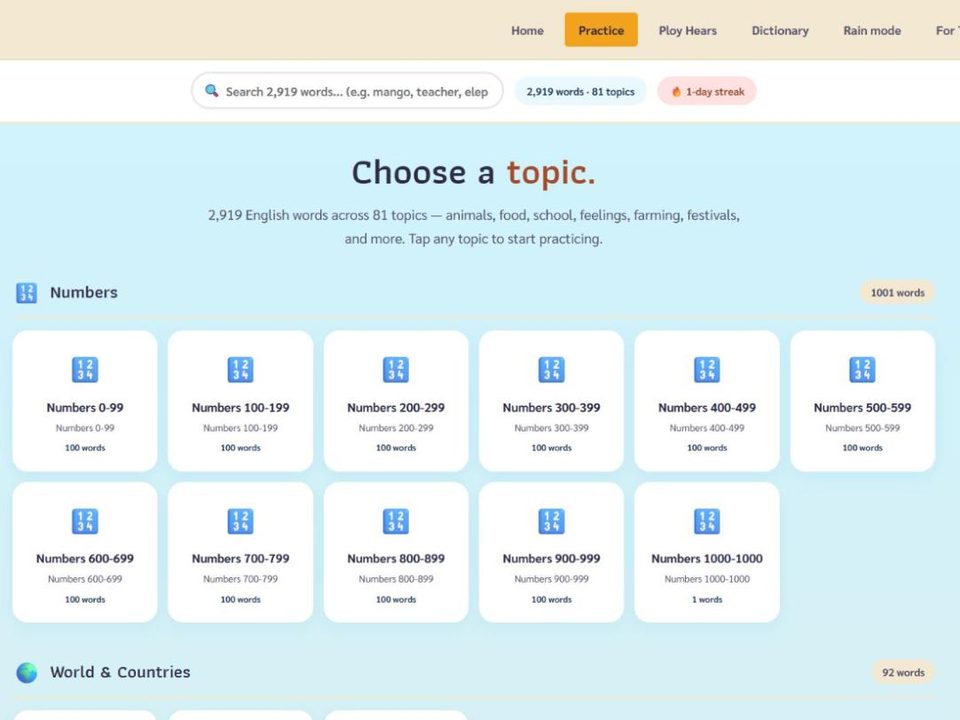
5. EnglishTeacher.com (the practice shelf and the daily clinic). The free pronunciation app I built for Thai children: tap a word, hear it, say it back, 2,919 words in 81 topics, an 82,683-word English–Thai dictionary with a voice, and Ploy Hears, a ten-week clinic on the sounds Thai speakers find hardest that one teacher can run from one phone. It installs on a phone and works offline afterward, with no login. How I will use it: Ploy Hears on the television for ten minutes a day as a Step 5 routine; the topic of the week on the screen during station rotation while I work with one table; a stable topic link sent home as the homework ("assign one as tonight's homework" is what the page is built for); the dictionary for the word nobody knows; the Print page for the A4 word list that goes home (Step 5, step 9). Rationale: it empowers a child to stay on track without an adult, which is the assignment's own phrase: the child controls the pace, hears the model as many times as they want and gets the Thai beside the English. It is the digital text with a paper twin by design (every topic prints), it needs no student account, and it costs nothing, so it meets all five criteria. The content is matched to what the room is already doing (TPACK), not a general app bent to fit. Data: none collected; no accounts; the children do not type anything.
6. ESLteacher.com worksheet builder (the paper twin machine). The free worksheet builder on ESLteacher.com, made for Thai classrooms: a leveled reading text with Thai translation and transliteration, pronunciation traps for Thai speakers, Thai-interference grammar notes, CEFR and Thai Basic Education Core Curriculum links, printed in about twenty seconds; plus a library of 36 ready-made topics mapped to the Thai curriculum from Anuban to Matthayom 6. How I will use it: every Box B text in the Step 5 library at three levels on three colors; the paper version of every Wayground or Nearpod activity; a worksheet for the newcomer with the Thai gloss on the page. Rationale: the plan's second criterion, that the lesson continues when the internet drops, is only real if producing paper is fast enough to do on the morning the signal fails. Leveled texts are what make a mixed room manageable (a P6 child at WIDA 1 and a P4 child at WIDA 3 both have work), and management problems in a mixed-ability class are mostly children with nothing they can do. Data: no login, nothing about a child goes in.
7. Google Forms and Sheets (the behavior log and the tally). Three short forms on my phone and the co-teacher's: an incident log (when, where, what came before, what happened, what we did; initials, not names), a weekly student self-rating done at the one screen in turn ("I was ready on time: 1–4", in Thai and English, with faces), and a transition tally (the minutes each transition took, Step 4's five-minute budget). Everything lands in one sheet. How I will use it: Friday, ten minutes with the co-teacher: which transition is slow, which child's incidents cluster after lunch, whose self-rating disagrees with ours. Rationale: data-based decision making is the part of positive behavior support that schools most often skip (Simonsen et al., 2008); a two-minute form is the difference between an impression and a pattern. The self-rating is a self-monitoring routine (Bruhn et al., 2015) for the whole class, not only the child with a plan. Privacy: the school's Google account, initials in the sheet, shared with the co-teacher and the head teacher only, cleared each term. Paper twin: the same three forms printed and clipped to the board.
Online classroom: the tools and the rationale
8. Zoom (the live room). The live lesson runs in Zoom on the free plan: waiting room on, everyone muted on entry, raise-hand and reactions for turns, chat on for the name-a-star game and off during instruction, breakout rooms for pairs. How I will use it: two twenty-minute blocks with a stand-up break between, which also fits the free plan's forty-minute meeting limit; the turn order on the first slide so every child knows their moment is coming (my own improvement from the climate vlog); one chorus unmute before anyone answers alone; the co-teacher as co-host managing the waiting room and the Thai chat. Rationale: an online classroom has to be designed, not improvised (Hodges, Moore, Lockee, Trust and Bond, 2020), and the management features are the design: the waiting room is the door, mute-on-entry is the arrival routine, raise-hand is the signal, breakout pairs are "say it to a partner first". Anne Shifley's online lesson, which I reviewed, managed turns out loud and had the class stand and turn; Zoom's controls are what let a teacher do that for forty children on phones. Privacy: no recording of lessons with children; first names only; the link goes to families one-to-one on LINE, never in a public post. Fallback: the lesson's slides and the worksheet are in Google Classroom before the meeting starts, and a child who drops out finishes on paper.
9. Google Classroom (the home base and the to-do list). One class, one stream, one assignment a day: the plan for the lesson, the EnglishTeacher.com topic link, the worksheet as a PDF, a photo of the word wall. How I will use it: the "To do" list is the child's own checklist, which they tick off, and the guardian email summary tells a parent what was set and what is missing. The Classroom app opens an assignment offline once it has loaded, which matters on a phone with no data left. Rationale: "empowering students to stay on track" needs a place where a child can see what is due without asking an adult; Classroom is free, runs on any phone, has a Thai interface, and does not need a child to have their own device or email beyond the school's. Fallback: the same list on paper, photographed into LINE.
10. Nearpod (every child answers online). Teacher-paced slides that each child follows on their phone, with a poll, an open answer, a draw-it or a matching task built into the slide; I see who has answered and who has not, live, and the post-session report afterward. How I will use it: the online version of Plickers: the word-wall check, "fist to five", and a draw-it for the newcomer who cannot yet type. Rationale: the silent children in the online lesson I reviewed were the ones no tool asked; Nearpod asks all of them on every slide, and shows me the gap before the lesson ends. The free Silver plan allows 40 students in a session and 300 MB of lessons (Nearpod, 2025), so a class over forty runs as two sessions, which also halves the noise. Join by code and first name; no student accounts. Fallback: the same questions printed from the slides.
11. Wayground, formerly Quizizz (the game with a paper version). Self-paced vocabulary quizzes with a live teacher dashboard, memes and music the children like; the platform renamed itself Wayground in 2025 (THE Journal, 2025). How I will use it: online, the Friday word-wall quiz as a game each child plays at their own pace on the family phone, with the dashboard showing me who is stuck; in the physical room, the same quiz printed as a paper quiz, because there are no devices. Rationale: game-based student response systems raise engagement, attendance and attention in the literature review of this family of tools (Wang and Tahir, 2020), and a quiz a child can take at their own pace with instant feedback is a self-monitoring tool in disguise. The paper print is the second criterion again: one quiz, two rooms. Data: join by code, nicknames.
12. The language-barrier tools: EnglishTeacher.com Translate and Google Translate. The Translate page on EnglishTeacher.com is a live, recordable English–Thai conversation tool: speak, see a transcript on screen, use quick phrasebook chips, look up any of the 2,919 words mid-conversation. Google Translate adds camera translation of a page or a form and conversation mode, with the Thai language pack downloaded so it works without signal. How I will use it: in the room, for the instruction a newcomer did not catch and for a Kui- or Khmer-speaking grandparent at the gate (Google Translate carries Khmer; for Kui it does not, and the child or an older sibling interprets); online, the co-teacher runs the Translate page on a second device so a family can ask a question in Thai during the lesson. Rationale: Step 4 lists "language barrier" supports for every transition; most of them are a picture and a Thai line, and these two tools are the picture and the Thai line when there was no time to prepare one. They are management tools because a child who does not understand the instruction is the next behavior problem. Privacy: no names are typed into either; nothing about a particular child is translated through a cloud service.
13. The storytelling recorder and the USAEnglish.com score sheet (the Friday stage). The in-browser recorder I built on this portfolio for my own vlogs records the webcam and a caption straight to the laptop, with nothing uploaded anywhere; with the story's title as the caption it records a child on the Friday stage (Step 5, step 8). USAEnglish.com, the storytelling championship I run with my wife, publishes the competition's score sheet and lesson plans, and a Thai page for parents. How I will use it: the best Friday tellings are recorded for the listening corner and transcribed for Box C; the children score each other with the USAEnglish.com score sheet (voice, eye contact, story, language) so the rubric is the same one the district judges use; a child who wins the school round has a recording ready for the district competition. Rationale: this is the "monitoring" tool for oral language: a recording is data a child can hear and improve against, and a shared rubric turns peer feedback from "good" into something specific; the stage is also the routine that gives status to children whose English is still small, which is what Standard 3 means by a community of learners. Privacy: recordings stay on the laptop; a child is recorded only with the signed consent; nothing goes on a public page; a competition entry is sent by the school, as the competition's own rules require.
Tools I considered and will not use, and why
- A Facebook class group. Common in Thai schools, but it is public by default, children's photographs end up in it, and it is an advertising platform; PDPA and the "no faces" rule say no. LINE one-to-one does the job.
- Device-monitoring software (GoGuardian, Securly, Hāpara, LanSchool and the like). Built for one-device-per-child schools; we have no devices, and surveillance is the opposite of the trust Standard 3 asks for.
- Anything that needs a child's own account or email (Kahoot! on forty-five phones, Blooket, Seesaw with a child login). PDPA consent for children under ten, no devices, and no benefit over Plickers and Nearpod with a join code.
- Flip (Flipgrid) and Google Jamboard, both retired by their makers in 2024; a plan should not rest on a tool that is gone.
- AI chatbots for children. Age limits, unverifiable content, and no need: the dictionary and the practice app answer the questions a Prathom child has.
- Paid behavior platforms (LiveSchool, PBIS Rewards, Bloomz premium). ClassDojo does what we need for nothing.
Rollout: one tool a week, the co-teacher first
| Week | Tool | Step it serves | With the co-teacher | With families |
|---|---|---|---|---|
| 1 | Classroomscreen; LINE class group | Step 4 signals; Step 5 home link | Co-admin of the group; the screen layout agreed | Thai consent letter home (photos, ClassDojo, recordings); first Sunday message |
| 2 | ClassDojo; EnglishTeacher.com on the TV | Step 4 jobs; Step 5 routines | Point categories written together in Thai and English; the app on her phone | Families invited to ClassDojo with the Thai code sheet |
| 3 | Plickers | Step 5 measure: words owned | Cards printed and laminated; she scans while I run the quiz | Word of the week voice note begins |
| 4 | Google Forms log and self-rating | Step 4 time budget; data review | Friday ten-minute review begins | — |
| 5 | ESLteacher.com worksheets; Wayground on paper | Step 5 three-level library | She builds the Thai-gloss version for the newcomer | Worksheet photo on LINE for lost copies |
| 6 | Storytelling recorder; USAEnglish.com score sheet | Step 5 Friday stage | She runs the camera; children score | Parents' page on USAEnglish.com linked in LINE |
| 7 | Online drill: Zoom, Google Classroom, Nearpod | The online classroom | Co-host; waiting room and Thai chat | A practice online lesson from home before any closure, with the link one-to-one |
| 8 | Review | All | Data from weeks 1–7 against the measures below; drop what is not used | Second Sunday message asks families what reached them |
How I will know the tools are working
| Tool | Measure | Target by week 8 |
|---|---|---|
| Classroomscreen | Transition minutes per lesson (Forms tally) | Five minutes or less in four lessons of five |
| ClassDojo | Positive to corrective ratio; incidents logged | At least 4:1; incidents down by a third from week 4 |
| Plickers / Nearpod | Children answering every question; words owned | 100% answering; 60 words owned, every child 30 |
| LINE / ClassDojo messages | Families who read the Sunday message; replies | 80% read; every family has replied once |
| EnglishTeacher.com / ESLteacher.com | Homework links opened at home (family report); worksheets completed | Half the homes; 90% of worksheets back |
| Zoom / Google Classroom / Nearpod drill | Attendance; every child speaks once; assignments turned in | 90% attend; 100% speak; 80% turn in |
| Recorder / score sheet | Children recorded on the stage | Every child once by week 8 |
Reflection: what technology changes about the climate
None of these tools makes the room calmer by itself; two of them could make it worse. A points app used for public shaming teaches children to watch the scoreboard instead of each other, and a monitoring tool used on children who have no devices would be theater. What the tools change is who can see what. The timer lets the class see time, the noise meter lets the class hear itself, the card lets the quiet child be counted, the voice note lets a grandmother into the lesson, and the recording lets a child hear their own English a week later and notice it grew. Standard 3 asks for an environment that encourages positive social interaction, active engagement and self-motivation; every tool here was chosen because it hands a piece of the management to the children or the families, and the ones I rejected were the ones that would have kept it all with me.
Virtual Class: the list we built of digital tools for managing classrooms and monitoring behavior
My contribution to the cohort's list, grouped by the job each tool does. Tools marked ★ are in my plan above. Free means free for a teacher at the time of writing; most have paid tiers.
A. Behavior data and positive reinforcement. ClassDojo ★ (points, attendance, Class Story, translated family messages; free) · Class123 (points and family messaging, Korean-made, popular in Asia; free) · LiveSchool (school-wide points and rewards; paid) · PBIS Rewards (school-wide positive behavior system; paid) · Bloomz (behavior and family communication; freemium) · Google Forms + Sheets ★ (a home-made incident log; free) · Additio (teacher gradebook with behavior notes; freemium).
B. Signals, timers, noise and attention. Classroomscreen ★ (timer, noise meter, traffic light, name picker, work symbols; free) · Bouncy Balls (noise shown as bouncing balls; free) · Too Noisy (noise meter app; free/paid) · Time Timer (the visual countdown clock, app or hardware; paid) · Wheel of Names (random picker; free) · Online-Stopwatch classroom timers (free).
C. Formative checks and keeping students on track. Plickers ★ (paper cards, teacher phone; free core) · Nearpod ★ (teacher-paced slides with built-in checks; free Silver plan) · Pear Deck (the same idea inside Google Slides; freemium) · Wayground ★, formerly Quizizz (self-paced games, printable; free) · Kahoot! (live quiz game; free basic, player caps) · Blooket and Gimkit (game modes on top of quizzes; freemium) · Wordwall (vocabulary games with printable versions; small free tier) · Seesaw (student portfolios and goals; freemium) · Google Classroom ★ (to-do list, guardian summaries; free) · EnglishTeacher.com ★ (self-paced pronunciation practice, homework links, Ploy Hears; free, offline, no login).
D. Family communication. LINE ★ (Thailand's messaging app; voice notes; free) · ClassDojo messaging ★ (translated into 130+ languages) · TalkingPoints (two-way messaging translated into 150+ languages, free for teachers) · Remind (class messaging, US-centric; freemium) · Bloomz · Seesaw Family · Google Translate ★ (camera, conversation, offline packs; free) · EnglishTeacher.com Translate ★ (live recordable English–Thai conversation with a transcript; free) · USAEnglish.com parents' page (a Thai-language page families can be sent a link to).
E. Online classroom management and monitoring. Zoom ★ (waiting room, mute-all, raise hand, breakout rooms; free with a 40-minute limit) · Google Meet (the same inside Google Workspace; breakout rooms need the paid education tier) · Microsoft Teams for Education (classes, assignments, meetings) · Google Classroom ★ · Nearpod ★ · Mentimeter (anonymous live polls and word clouds; freemium) · Padlet (moderated class boards; small free tier) · GoGuardian, Securly Classroom, Hāpara, LanSchool, Classroom.cloud (screen and device monitoring for one-device-per-child schools; paid) · Kami (annotating PDFs together; freemium).
F. Recording, performance and portfolios. The benjamincunningham.com recorder ★ (in-browser webcam recorder with captions, records to the laptop; free) · USAEnglish.com score sheet and lesson plans ★ (the district Story Telling rubric; free) · Seesaw · Book Creator (class books; freemium).
Changed or gone, so not on the list: Quizizz is now Wayground (2025); Flip (Flipgrid) was retired by Microsoft in 2024; Google Jamboard was shut down in 2024.
References
- Bergman, P. (2021). Parent-child information frictions and human capital investment: Evidence from a field experiment. Journal of Political Economy, 129(1), 286–322.
- Bruhn, A., McDaniel, S., & Kreigh, C. (2015). Self-monitoring interventions for students with behavior problems: A systematic review of current research. Behavioral Disorders, 40(2), 102–121.
- ClassDojo. (2025). What languages does ClassDojo support? ClassDojo Help Center. https://help.classdojo.com/hc/en-us/articles/23784303516301
- Dillon, M. B. M., Radley, K. C., Tingstrom, D. H., Dart, E. H., & Barry, C. T. (2019). The effects of tootling via ClassDojo on student behavior in elementary classrooms. School Psychology Review, 48(1), 18–30.
- Hodges, C., Moore, S., Lockee, B., Trust, T., & Bond, A. (2020, March 27). The difference between emergency remote teaching and online learning. EDUCAUSE Review.
- Kraft, M. A., & Rogers, T. (2015). The underestimated power of teacher–parent communication: Evidence from a field experiment. Economics of Education Review, 47, 49–63.
- Krause, J. M., O'Neil, K., & Dauenhauer, B. (2017). Plickers: A formative assessment tool for K–12 and PETE professionals. Strategies, 30(3), 30–36.
- Lynne, S., Radley, K. C., Dart, E. H., Tingstrom, D. H., Barry, C. T., & Lum, J. D. K. (2017). Use of a technology-enhanced version of the Good Behavior Game in elementary school classrooms. Psychology in the Schools, 54(9), 1049–1063.
- Mishra, P., & Koehler, M. J. (2006). Technological pedagogical content knowledge: A framework for teacher knowledge. Teachers College Record, 108(6), 1017–1054.
- Nearpod. (2025). Pricing. https://nearpod.com/pricing
- Personal Data Protection Act B.E. 2562 (2019), Thailand, Section 20 (consent of minors).
- Plickers. (2025). Frequently asked questions. Plickers Help Center. https://help.plickers.com/hc/en-us/articles/360042596254
- Relevant Audience. (2026). LINE Thailand puts 56 million users and 12 billion Official Account conversations behind its 2026 business stack (reporting LINE Thailand's figures via Marketing Oops, August 2026).
- Simonsen, B., Fairbanks, S., Briesch, A., Myers, D., & Sugai, G. (2008). Evidence-based practices in classroom management: Considerations for research to practice. Education and Treatment of Children, 31(3), 351–380.
- THE Journal. (2025, June 24). Quizizz rebrands as Wayground, announces new AI features.
- Wang, A. I., & Tahir, R. (2020). The effect of using Kahoot! for learning: A literature review. Computers & Education, 149, 103818.
- Tools built by the author for Thai classrooms and used in this plan: EnglishTeacher.com (practice app, dictionary, Ploy Hears, Print and Translate pages), ESLteacher.com (worksheet builder and curriculum library), USAEnglish.com (Story Telling championship, score sheet, lesson plans, parents' page), and the recorder at benjamincunningham.com/lep/vlog/. Photographs: the author's own.
← Step 5 · Information-Intensive Environment · All courses · ED 504 page · Next: Step 7 · Family Communication →